Controls
- WASD or arrow keys to move
- Mouse scroll up to switch weapons
- Left mouse button to attack
- E to open the inventory
- Right mouse button to place an item
- Space bar to jump
- F to open the task menu
- 1234 to use accessory
- Esc to open the menu
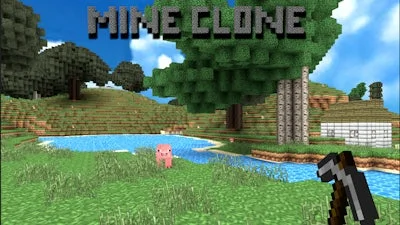


Imagine a 3D sandbox where every block feels like a fresh canvas. Mine Clone drops you into a pixel‑perfect world that riffs on the classic Minecraft vibe, but it’s all yours to shape. Build towering castles, dig deep caverns, or simply roam the endless horizons. The game rewards curiosity, so the moment you place your first block you’ll wonder what else you can create.
Master the core loop with a handful of keys. Move, attack, place, and manage inventory without pausing the action:
Staying ahead means mixing creativity with survival instincts. Start by gathering basic resources – wood, stone, and a few Animal hides. Craft a pickaxe, then dig down to find ore. The deeper you go, the tougher the mobs become, so keep your weapons upgraded. Hunting provides food and rare drops; set traps near your base to turn the wilderness into a supply line. When you’re stocked, shift focus to Building. Layer blocks to create farms, redstone‑like contraptions, or massive skylines that can be seen from any angle. The 3D perspective lets you experiment with height and depth, turning simple walls into intricate fortresses. Each new structure unlocks a task in the menu, nudging you toward bigger projects and rewarding you with exclusive accessories.
Ready to claim your spot in this blocky universe? Jump into Mine Clone now, craft, hunt, and build to your heart’s content. UfreeGames has packed the experience with endless possibilities – all you need is the will to shape them. Grab your gear, fire up the game, and start stacking those blocks today.

We use cookies to help you navigate efficiently and perform certain functions. You will find detailed information about all cookies under each consent category below.
The cookies that are categorised as "Necessary" are stored on your browser as they are essential for enabling the basic functionalities of the site.
Necessary cookies are required to enable the basic features of this site, such as providing secure log-in or adjusting your consent preferences. These cookies do not store any personally identifiable data.
Functional cookies help perform certain functionalities like sharing the content of the website on social media platforms, collecting feedback, and other third-party features.
Analytical cookies are used to understand how visitors interact with the website. These cookies help provide information on metrics such as the number of visitors, bounce rate, traffic source, etc.
Advertisement cookies are used to provide visitors with customised advertisements based on the pages you visited previously and to analyse the effectiveness of the ad campaigns.
We also use third-party cookies that help us analyse how you use this website, store your preferences, and provide the content and advertisements that are relevant to you. These cookies will only be stored in your browser with your prior consent.
You can choose to enable or disable some or all of these cookies but disabling some of them may affect your browsing experience.