Your Ad Here
Click to play
x
Controls

Controls

Go back, close menu, open game menu

  • Keyboard - [ Esc / X / Numpad - ]
  • Gamepad - [ Cancel (East) ]

Click or press menu buttons

  • Keyboard - [ Submit (Enter) / Space ]
  • Gamepad - [ Submit (South) ]

Navigate menu buttons or sudoku board

  • Keyboard - [ WASD / Arrow keys ]
  • Gamepad - [ D-pad / Any stick ]

Switch focus between menu buttons and sudoku board

  • Keyboard - [ Ctrl / K / Numpad (/) ]
  • Gamepad - [ West / Select / Left shoulder]

Toggle pencil or note

  • Keyboard - [ Tab / N / Numpad + ]
  • Gamepad - [ North / Right shoulder ]

Input/note number in cell

  • Keyboard - [ Number or Numpad keys 123456789 ]

Erase/empty cell

  • Keyboard - [ Number or Numpad key 0 / Backspace ]

Pause game

  • Keyboard - [ ` / P / Numpad * ]
  • Gamepad - [ Start ]

Fullscreen / window mode

  • Keyboard - [ F11 ]
Shaolin Sudoku

Shaolin Sudoku

Shaolin Sudoku
Click to play
This game is not available on mobile.
rotate phone

Shaolin Sudoku – Mind‑Sharp 2D Puzzle Action

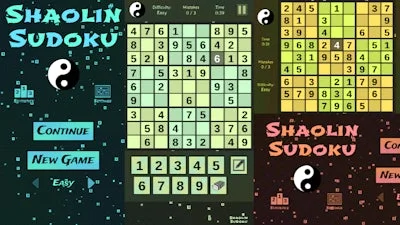
Step onto the tatami of logic with Shaolin Sudoku. This 1 Player, 2D Sudoku experience blends clean aesthetics with a monk‑like focus on precision. Three difficulty tiers keep the challenge fresh, while a strict mistake limit forces you to think before you write. Master the grid, earn bragging rights, and prove that your brain can stay as steady as a Shaolin stance.

Mechanics

Control the board with a handful of intuitive inputs. Whether you favor keyboard shortcuts or a gamepad, every action feels crisp and immediate.

  • Go back, close menu, open game menu – Keyboard: Esc / X / Numpad -; Gamepad: Cancel (East)
  • Submit selection – Keyboard: Enter / Space; Gamepad: Submit (South)
  • Navigate menu or board – Keyboard: WASD / Arrow keys; Gamepad: D‑pad / Any stick
  • Switch focus between UI and grid – Keyboard: Ctrl / K / Numpad /; Gamepad: West / Select / Left shoulder
  • Toggle pencil / note mode – Keyboard: Tab / N / Numpad +; Gamepad: North / Right shoulder
  • Input number – Keyboard: 1‑9 (Number or Numpad)
  • Erase cell – Keyboard: 0 (Number or Numpad) / Backspace
  • Pause game – Keyboard: ` / P / Numpad *; Gamepad: Start
  • Toggle fullscreen – Keyboard: F11
Shaolin Sudoku Gameplay

Strategy

Start on Easy mode and practice scanning rows, columns, and 3×3 blocks without rushing. Spot the “hidden singles” first – those numbers that appear in only one possible cell of a unit. Once you’re comfortable, switch to Medium and force yourself to use the pencil mode; marking candidates reduces back‑tracking later.

Advanced players treat each mistake as a penalty. Because the game limits errors, develop a habit of double‑checking before you hit Submit. Use the note system to eliminate possibilities, then clear the board methodically. When you reach Hard, look for “X‑wing” and “Swordfish” patterns – classic Sudoku techniques that separate the elite from the casual.

Progression isn’t just about difficulty. Completing a puzzle unlocks a subtle visual upgrade: the background fades from misty bamboo to a crisp temple interior. Those visual cues keep the experience fresh and give a sense of accomplishment without breaking the meditative flow.

UfreeGames designed Shaolin Sudoku to feel like a quick mental workout or a deep session of brain‑training, depending on your schedule. The clean 2D layout eliminates distractions, letting you focus on pure logic. Play a single puzzle during a coffee break or chain several together for a marathon mind‑flex.

Ready to test your mental discipline? Launch Shaolin Sudoku now, lock in your first board, and let every correct number bring you one step closer to Sudoku mastery.


Instructions:

Controls

Go back, close menu, open game menu

  • Keyboard - [ Esc / X / Numpad - ]
  • Gamepad - [ Cancel (East) ]

Click or press menu buttons

  • Keyboard - [ Submit (Enter) / Space ]
  • Gamepad - [ Submit (South) ]

Navigate menu buttons or sudoku board

  • Keyboard - [ WASD / Arrow keys ]
  • Gamepad - [ D-pad / Any stick ]

Switch focus between menu buttons and sudoku board

  • Keyboard - [ Ctrl / K / Numpad (/) ]
  • Gamepad - [ West / Select / Left shoulder]

Toggle pencil or note

  • Keyboard - [ Tab / N / Numpad + ]
  • Gamepad - [ North / Right shoulder ]

Input/note number in cell

  • Keyboard - [ Number or Numpad keys 123456789 ]

Erase/empty cell

  • Keyboard - [ Number or Numpad key 0 / Backspace ]

Pause game

  • Keyboard - [ ` / P / Numpad * ]
  • Gamepad - [ Start ]

Fullscreen / window mode

  • Keyboard - [ F11 ]
Customise Consent Preferences Close

We use cookies to help you navigate efficiently and perform certain functions. You will find detailed information about all cookies under each consent category below.

The cookies that are categorised as "Necessary" are stored on your browser as they are essential for enabling the basic functionalities of the site.

Always Active

Necessary cookies are required to enable the basic features of this site, such as providing secure log-in or adjusting your consent preferences. These cookies do not store any personally identifiable data.

Functional cookies help perform certain functionalities like sharing the content of the website on social media platforms, collecting feedback, and other third-party features.

Analytical cookies are used to understand how visitors interact with the website. These cookies help provide information on metrics such as the number of visitors, bounce rate, traffic source, etc.

Advertisement cookies are used to provide visitors with customised advertisements based on the pages you visited previously and to analyse the effectiveness of the ad campaigns.

We also use third-party cookies that help us analyse how you use this website, store your preferences, and provide the content and advertisements that are relevant to you. These cookies will only be stored in your browser with your prior consent.

You can choose to enable or disable some or all of these cookies but disabling some of them may affect your browsing experience.