Shadow of the Orient – A Pixel‑Powered Side‑Scrolling Assault
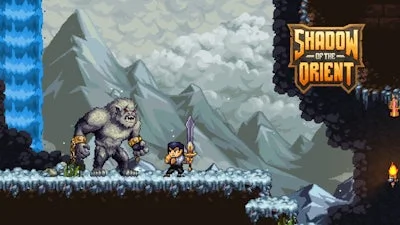
Pixel art meets razor‑sharp combat in this Japanese‑inspired 2D platformer. You take the role of a lone swordsman, slicing through relentless samurai waves and mythic beasts. Three sprawling acts hide secrets, loot, and hidden quests. Every level feels alive, thanks to fluid animation and tight controls. If you crave fast‑paced swordplay and a world that rewards exploration, this title grabs you by the collar and doesn’t let go.
Mechanics
Controls are stripped down to what matters: movement, jump, attack, dash, and weapon swaps. Keyboard defaults are ready out of the box, while mobile users can flip to a fixed, dynamic, or D‑Pad layout in the settings.
- Keyboard Controls: WASD = move Space = jump Enter = attack Shift = dash C = switch F = skip dialogue Q = swap weapons
- You can change the controls as you like in the game settings.
- Mobile Controls: Change the controls to mobile in the game settings. (Fixed / Dynamic / D-Pad)
Strategy
Master the dash to dodge enemy combos and close distance for a perfect sword strike. Each enemy type has a tell‑tale animation; learn it and counter with a timed attack. Collect hidden scrolls and relics to upgrade your blade and unlock new techniques. The later acts introduce platform puzzles that demand precise jumps—don’t rush, line up your landing and keep the momentum. Layer your upgrades: boost speed for side‑scroll sections, then pour points into damage for boss encounters. The secret rooms scattered across the map reward thorough exploration, so revisit cleared stages after each upgrade to uncover missed loot.
Ready to slice through the darkness? Grab Shadow of the Orient now, and let UfreeGames deliver the pixel‑perfect showdown you’ve been hunting for.
You can change the controls as you like in the game settings.
Change the controls to mobile in the game settings. (Fixed / Dynamic / D-Pad)