Police and Thief – Outsmart the Criminal in This Fast-Paced Strategy Game
Police and Thief is a high-stakes puzzle game where split-second decisions and clever planning are the difference between victory and defeat. You take control of the Police, tasked with capturing a tricky Thief who always moves to stay ahead. The challenge? He’ll never let you corner him unless you play your cards right. With each move, the Thief dodges, adapting to your every strategy. Only the sharpest minds can outthink and outmaneuver this crafty criminal. It’s a battle of wits, speed, and tactics — and the clock is ticking.
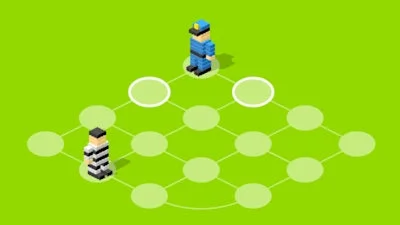
Mastering Police and Thief requires more than quick reflexes — you need a solid grip on how the controls work. The game is designed for easy, intuitive play:
- Controls: Left Mouse Button or Tap on Screen = Select space to move to
- Every move the Police make is countered by a move from the Thief — he always runs away unless you cut off his escape
- Plan your path carefully — one wrong move and he’ll be three steps ahead again
UfreeGames Tips to Master Police and Thief
Strategy is key in Police and Thief. Don’t just chase the Thief — think two moves ahead. Use the layout of the board to your advantage, and watch for patterns in his movement. The Flash interface ensures smooth gameplay, making every decision feel instant. Set up traps, corner him, and force his hand. Each level increases in difficulty, testing your ability to adapt. Replayability is high — beat your time, outsmart the AI, and climb the ranks. This game isn’t just about luck — it’s about Strategy, patience, and precision.
Looking for more mind-bending challenges? Check out Police and Thief on UfreeGames and test your skills against some of the toughest puzzles around. Whether you’re a casual player or a hardcore strategist, this game is built to keep you coming back for more — and it’s free to play! Sharpen your wits, step into the shoes of the Police, and see if you have what it takes to outthink the Thief. The next level is just one click away.
Left Mouse Button/Tap screen = Select space to move to