Cubes 3D – The Ultimate 3‑D Tetris Twist
UfreeGames drops a fresh spin on the classic block‑stacking craze. In Cubes 3D, every layer you clear climbs your score skyward. The higher you build, the richer the points. It’s a single‑player mind‑bender that rewards daring placements and razor‑sharp logic. If you love Tetris but crave a new dimension, this is the puzzle that forces you to think three steps ahead.
Mechanics
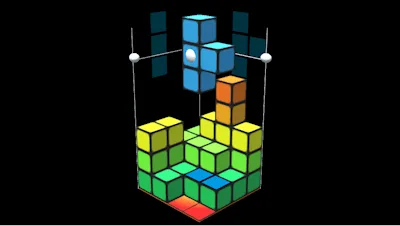
Control the floating cubes with mouse gestures and a handful of keyboard shortcuts. The interface is clean, the feedback instant. Master the basics, then start stacking like a pro.
- Controls (keys can be reassigned) New piece: click two times
- Move slowly piece down: drag white ball down
- Move piece: hold right mouse button on blue piece and drag
- Rotate piece: hold left mouse button and drag
- Rotate camera: hold right mouse, not on blue piece and drag
- Use Keypad keys 1-9 to move
- Use QWEASDZC to rotate
- Space bar new piece
Strategy
Don’t treat this like ordinary Tetris. The top layers hand out bonus points, so aim for high‑altitude clears. Start by creating a stable base, then deliberately leave gaps where you can later drop a long piece to finish a layer in one swift move. Rotate the camera often; a fresh angle reveals hidden slots and prevents accidental dead‑ends. Keep an eye on the upcoming piece queue—anticipating its shape saves precious seconds. As you climb, the puzzle’s speed ramps up, demanding quicker decisions without sacrificing precision. Practice the “slow‑drag” technique for delicate drops; it’s the secret sauce for perfect fits.
Ready to dominate the 3‑D stack and smash those high scores? Jump straight into the action on Cubes 3D and prove your logic can out‑maneuver any falling block. For more mind‑twisting titles, explore the full catalog at UfreeGames. Play now, stack higher, score bigger.