Controls
- WASD or arrow keys = move
- Left-click = mine block
- Right-click = place block
- Q = inventory
- E = action
- F = flight mode
- R = change camera view
- H = hide the interface
- P = pause



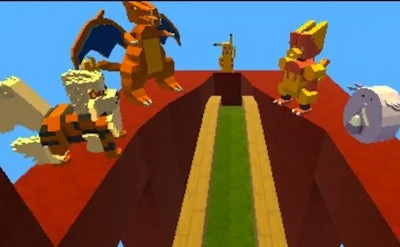
Craft World throws you into a pixel‑perfect sandbox where every block matters. The 3D simulation feels like a love letter to classic Minecraft, but the freedom to stack, shape, and style is yours alone. Build towering castles, cozy cabins, or impossible sculptures—nothing caps your imagination. If you crave a sandbox that rewards both creativity and precision, this is the arena that finally lets you own every square foot.
Master the keyboard, then let the world bend to your will. Every action maps to a single key, so you spend more time building and less time hunting menus.
Success in Craft World isn’t about random placement; it’s about layered planning. Start with a solid foundation—use stone or reinforced wood to avoid collapse when you stack the first hundred blocks. Mix material textures early; a pattern of stone, wood, and glass instantly upgrades a plain house to a showcase. Crafting tools and decorative furniture unlocks new palettes, so keep an eye on resource hotspots and set up mini‑farms for endless supplies. When you master flight mode, the sky becomes your new building floor—experiment with floating islands or vertical farms to keep the terrain fresh. The game’s progression is tied to your own ambition: the more elaborate your builds, the more complex recipes you unlock, feeding a loop that keeps you glued for hours.
Ready to dominate the pixel frontier? Grab your pick, fire up the simulation, and start stacking today. Craft World lives under the UfreeGames banner, so you know the experience is polished, bug‑free, and constantly expanding. Install now, claim your first plot, and watch the community marvel at the structures you conjure. The only limit is the next block you place—let’s see how high you can build.

We use cookies to help you navigate efficiently and perform certain functions. You will find detailed information about all cookies under each consent category below.
The cookies that are categorised as "Necessary" are stored on your browser as they are essential for enabling the basic functionalities of the site.
Necessary cookies are required to enable the basic features of this site, such as providing secure log-in or adjusting your consent preferences. These cookies do not store any personally identifiable data.
Functional cookies help perform certain functionalities like sharing the content of the website on social media platforms, collecting feedback, and other third-party features.
Analytical cookies are used to understand how visitors interact with the website. These cookies help provide information on metrics such as the number of visitors, bounce rate, traffic source, etc.
Advertisement cookies are used to provide visitors with customised advertisements based on the pages you visited previously and to analyse the effectiveness of the ad campaigns.
We also use third-party cookies that help us analyse how you use this website, store your preferences, and provide the content and advertisements that are relevant to you. These cookies will only be stored in your browser with your prior consent.
You can choose to enable or disable some or all of these cookies but disabling some of them may affect your browsing experience.